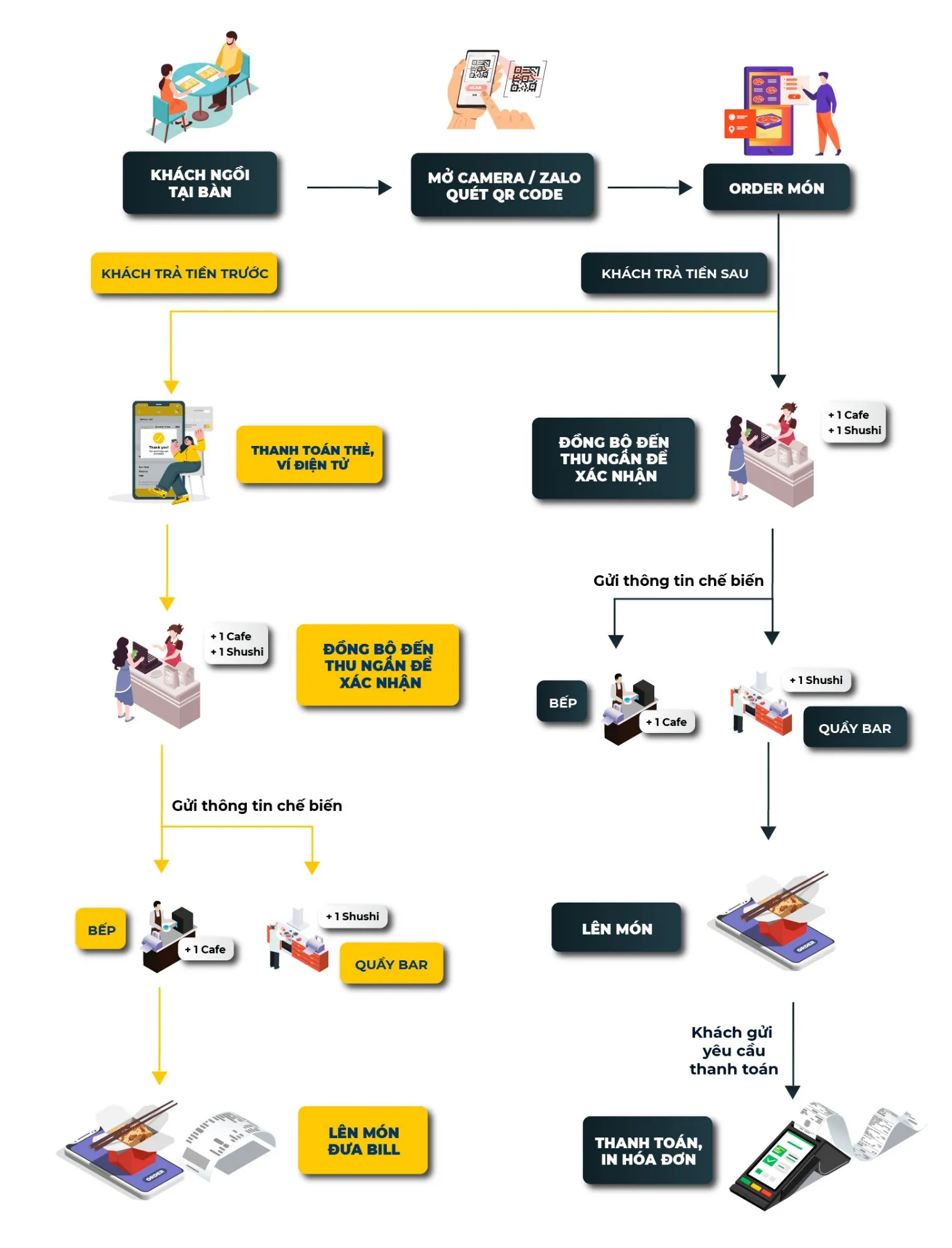
# TÍNH NĂNG QR CODE ORDER TẠI BÀN

<figure><img src="https://1300779801-files.gitbook.io/~/files/v0/b/gitbook-x-prod.appspot.com/o/spaces%2F-MXFSIGoxOOM1xROtoGl%2Fuploads%2FoE6EVG0RAap4mttPErth%2Fimage.png?alt=media&#x26;token=ec123a6f-c8db-4e07-b500-fa59cd8d5a22" alt=""><figcaption></figcaption></figure>

**A. Các thiết lập ban đầu**

**1. Thiết lập, khởi tạo phòng bàn ( chỉ khởi tạo từ web admin thì mới khởi tạo được mã QR bàn)**

**2. Khởi tạo và in mã QR bàn và dán lên các bàn tương ứng**

**3. Lựa chọn mô hình cho cửa hàng (khách order xong có thể thanh toán trước hoặc sau)**

**4. Thêm các phương thức thanh toán khác (Momo, Payon,...)**

**5. Thiết lập in bếp cho các đơn hàng được đặt qua QR code**

{% content-ref url="tinh-nang-qr-code-order-tai-ban/a.-cac-thiet-lap-ban-dau" %}
[a.-cac-thiet-lap-ban-dau](https://docs.posapp.vn/qr-order-ban/tinh-nang-qr-code-order-tai-ban/a.-cac-thiet-lap-ban-dau)
{% endcontent-ref %}

**B. Hướng dẫn thao tác order bằng QR code**

{% content-ref url="tinh-nang-qr-code-order-tai-ban/b.-huong-dan-thao-tac-order-bang-qr-code" %}
[b.-huong-dan-thao-tac-order-bang-qr-code](https://docs.posapp.vn/qr-order-ban/tinh-nang-qr-code-order-tai-ban/b.-huong-dan-thao-tac-order-bang-qr-code)
{% endcontent-ref %}


---

# Agent Instructions: Querying This Documentation

If you need additional information that is not directly available in this page, you can query the documentation dynamically by asking a question.

Perform an HTTP GET request on the current page URL with the `ask` query parameter:

```
GET https://docs.posapp.vn/qr-order-ban/tinh-nang-qr-code-order-tai-ban.md?ask=<question>
```

The question should be specific, self-contained, and written in natural language.
The response will contain a direct answer to the question and relevant excerpts and sources from the documentation.

Use this mechanism when the answer is not explicitly present in the current page, you need clarification or additional context, or you want to retrieve related documentation sections.